For students belonging to the Scheduled Caste (SC), Scheduled Tribe (ST), and Other Backward Class (OBC) communities in Madhya Pradesh, financial constraints should never be a barrier to higher education. The Madhya Pradesh Tribal Affairs & Scheduled Caste Welfare Automation System, commonly known as MPTAAS, is a revolutionary digital initiative by the state government designed to eliminate this hurdle.
This comprehensive online portal is a one-stop solution for managing pre-matric and post-matric scholarships. By digitizing the entire workflow—from application to disbursement—MPTAAS ensures transparency, eliminates paperwork, and guarantees that financial aid reaches students directly through Direct Benefit Transfer (DBT).
Whether you are looking for MPTAAS login instructions, need to create a new MPTAAS profile, or want to track your MPTAAS scholarship status, this guide provides every detail you need for the 2025-26 academic year.
MPTAAS Login: How to Access Your Account
Once you have registered, you can log in to your MPTAAS profile anytime to apply for scholarships, check your status, or update your details.
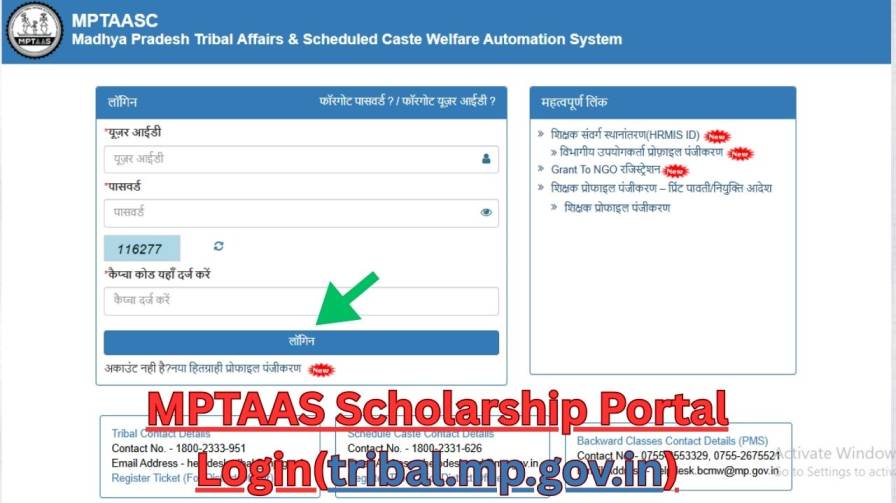
Step 1: Go to the Official Website
Visit https://tribal.mp.gov.in/MPTAAS.
Step 2: Click on Login
On the homepage, locate and click on the "Login" or "Student Login" (छात्र लॉगिन) button.
Step 3: Enter Your Credentials
- User ID: Enter your Samagra ID or the User ID generated during registration.
- Password: Enter the password you created during registration.
Step 4: Complete Security Verification
- CAPTCHA: Enter the characters shown in the image to verify you are not a bot.
- OTP (if prompted): Enter the OTP sent to your registered mobile number or email.
Step 5: Access Your Dashboard
Click "Sign In" or "Login". You will be directed to your personalized student dashboard. From here, you can:
- Apply for a new scholarship
- Renew your existing scholarship
- Check your application status
- Update your profile details
- Track payment status
Forgot Password?
If you forget your password, click on the "Forgot Password" link on the login page. Enter your Samagra ID or registered mobile number, verify with OTP, and set a new password.
🚀 How to Register on the MPTAAS Portal (New Beneficiary)
Creating your MPTAAS profile is the first and most crucial step. Follow these instructions for a successful MPTAAS Registration:
- Visit the Official Portal: Open your browser and go to the official website: https://tribal.mp.gov.in/MPTAAS.
- Start Registration: On the homepage, find and click on the link that says "New Beneficiary Profile Registration" or "नया हितग्राही प्रोफाइल पंजीकरण."
- Fetch Details via Samagra ID: You will be prompted to enter your 10-digit Samagra ID. Click "Fetch Details." Your basic personal information will be auto-filled from the Samagra database.
- Complete Aadhaar e-KYC: Authenticate your identity using Aadhaar. You will receive an OTP on your Aadhaar-linked mobile number. Enter the OTP to proceed.
- Fill in the Registration Form: Carefully fill in all remaining required fields, including:
- Full Name (as per educational records)
- Date of Birth
- Category (SC/ST/OBC)
- Mobile Number and Email ID
- Create a unique Username and a strong Password.
- Submit and Save Your Credentials: Click the "Submit" button. Upon successful registration, the system will generate your unique MPTAAS Portal ID. Note this ID down immediately, as you will need it for all future logins.
✍️ Complete Online Application Process for MPTAAS Scholarship 2026
After logging in, follow this guide to submit your application for the 2025-26 academic year:
- Navigate to Application Form: From the 'PMS' (Post Matric Scholarship) dropdown menu on your dashboard, select "Application Apply."
- Select Application Type: A new page will open. Choose the admission year (2025-26), select whether your application is "Fresh" or "Renewal," and pick your course type (e.g., Post-Matric, Professional). Click "Go to Apply."
- Fill the Application Form: A detailed form will appear. Meticulously fill in all academic, personal, and bank details. Double-check every field for accuracy.
- Upload Documents: Upload the scanned copies of all required documents (from the checklist above) in the specified sections and in the prescribed format.
- Review and Declare: Before final submission, review all entered information and uploaded documents. Check the declaration box to acknowledge that all details are true and correct.
- Final Submit: Click the final "Submit" button. Upon successful submission, a unique Application/Reference Number will be generated. Note this number down carefully—it is essential for all future MPTAAS scholarship status checks.
🔎 How to Check Your MPTAAS Scholarship Status
Tracking your MPTAAS scholarship status is simple and can be done in two ways:
Method 1: Through Student Login
- Log in to your MPTAAS Profile using your User ID and Password.
- Navigate to the 'PMS' dropdown menu and select "Application Status."
- Select the relevant academic year and enter your Application ID if prompted.
- Click Submit. Your current status will be displayed:
- Pending: Under verification at the institution or department level.
- Approved: Application verified and approved for payment.
- Rejected: Application rejected due to ineligibility or document discrepancy (reasons are usually mentioned).
Method 2: Through the Guest Login / Track Option
Click Submit to view your MPTAAS scholarship status instantly.What is MPTAAS
On the portal's homepage, click on the "Track Application Status" option.
Enter your Application ID and the Academic Year.
MPTAAS (Madhya Pradesh Tribal Affairs Automation System) is the official online platform launched by the Tribal Welfare Department, Government of Madhya Pradesh. Its primary mission is to streamline the process of applying for and disbursing scholarships to eligible SC, ST, and OBC students.
By leveraging technology, the portal connects students, educational institutions, and government departments on a single platform. This ensures that scholarships are processed efficiently and funds are transferred securely into the bank accounts of verified beneficiaries, upholding the highest standards of transparency.
🔄 MPTAAS Scholarship Renewal Process
Renewing your MPTAAS scholarship each year is a straightforward process:
- Perform your MPTAAS login.
- On your dashboard, click on the "Scholarship Renewal" or similar option within the PMS menu.
- Provide the details for the new academic session, such as your current course, year, and institution.
- Upload the latest required documents (previous year's marksheet, current year's fee receipt, and a new bonafide certificate).
- Verify and update your personal and bank details if necessary.
- Submit the renewal form and note the new application number generated for tracking.
💰 MPTAAS Scholarship Amount Details
The MPTAAS scholarship amount varies based on the course level and whether you are a day scholar or a hosteller. Below is a general structure:
| Education Level / Course | Day Scholars (₹ per month) | Hostellers (₹ per month) |
|---|---|---|
| Post-Matric (Class 11–12) | ₹230 – ₹380 | ₹380 – ₹1,200 |
| Graduate Courses (BA, B.Sc, B.Com) | ₹300 – ₹570 | ₹570 – ₹1,200 |
| Professional/Technical Courses | ₹550 – ₹1,200 | ₹1,200 – ₹2,300 |
| Medical/Engineering/Management | ₹1,000 – ₹1,500 | ₹2,000 – ₹2,500 |
Note: Additional benefits like tuition fee reimbursement, book allowances, and exam fee coverage may also apply as per scheme guidelines.
✅ MPTAAS Scholarship Eligibility Criteria
Before proceeding with registration, ensure you meet the following criteria for the MPTAAS scholarship:
- Category: Must belong to SC, ST, or OBC (as per MP government list).
- Residency: Must be a permanent resident of Madhya Pradesh (valid Domicile Certificate required).
- Education Level: Enrolled in a post-matric course (Class 11 and above, including ITI, Diploma, UG, PG, and professional degrees).
- Institution: Studying at a government-recognized or affiliated institution.
- Income Limit:
- SC/ST: Annual family income less than ₹2.5 Lakh.
- OBC: Annual family income less than ₹1.5 Lakh.
- Academic Standing: Must have passed the previous final examination.
- Samagra ID: A valid and active 10-digit Samagra ID is mandatory.
📄 Required Documents Checklist
Keep scanned copies of the following documents ready before you start the MPTAAS application process:
- Samagra ID
- Aadhaar Card (linked to active mobile number)
- Caste Certificate
- Income Certificate
- Domicile Certificate (Madhya Pradesh)
- Previous Year's Marksheet
- Bonafide Certificate (for the current academic year)
- Bank Account Details (Account Number & IFSC Code)
- Fee Receipt (if applicable)
- Passport-size Photograph
📞 MPTAAS Department Contacts & Helpline
For any queries or technical support, always reach out to the official departments directly. Avoid third-party agents who may charge unnecessary fees.
| Department | Contact Number | Support Link |
|---|---|---|
| Tribal Affairs | 1800-2333-951 | Register a Ticket on portal |
| Schedule Caste Development | 1800-2331-626 | Register a Ticket on portal |
| Backward Classes (PMS) | 0755-2553329, 0755-2675521 | Register a Ticket on portal |
Frequently Asked Questions (FAQ)
1. What is the MPTAAS Scholarship?
The MPTAAS Scholarship is a financial assistance program launched by the Madhya Pradesh government for SC, ST, and OBC students to help them pursue higher education beyond Class 10, including college, diploma, and professional courses.
2. Who can apply for the MPTAAS Scholarship?
Students belonging to SC, ST, or OBC categories who are permanent residents of Madhya Pradesh and enrolled in full-time post-matric courses with family income within the prescribed limits can apply.
3. How do I apply for the MPTAAS Scholarship?
You can apply online by registering on the official portal tribal.mp.gov.in/MPTAAS with your Samagra ID, filling out the application form, and uploading the required documents.
4. What is the official website for MPTAAS?
The official website is https://tribal.mp.gov.in/MPTAAS.
5. What documents are required for MPTAAS registration?
You need Samagra ID, Aadhaar Card, caste certificate, income certificate, domicile certificate, bank account details, recent photograph, bonafide certificate, and latest marksheet.
6. How much scholarship amount will I receive?
The amount varies based on your course and whether you are a hosteller or day scholar, ranging from ₹230 to ₹1,500 per month.
7. How can I check my MPTAAS scholarship status?
Log in to the MPTAAS portal, navigate to the PMS section, and click on "Application Status" to view your current status.
8. What should I do if I forget my MPTAAS login password?
Click on "Forgot Password" on the login page, enter your Samagra ID or registered mobile number, verify with OTP, and set a new password.